Roblox Beta Features 2026 – Amazing Changes Players Should Know
Roblox Beta Features 2026 are bringing exciting possibilities to the Roblox platform, from improved game creation tools to new ways of discovering and enjoying interactive experiences. Whether you play Roblox on Android, PC, or another supported device, understanding these developments can help you make better use of the platform.
However, it is important to understand that Roblox Studio Beta features are often designed for game developers rather than regular players. Some features are experimental, while others gradually become available to more users. Roblox’s official announcements are the best place to verify which changes have launched and which are still being tested.
In this guide, we will explore important Roblox developments in 2026, explain how beta features work, and show you how to access supported features safely.
What Are Roblox Beta Features 2026?
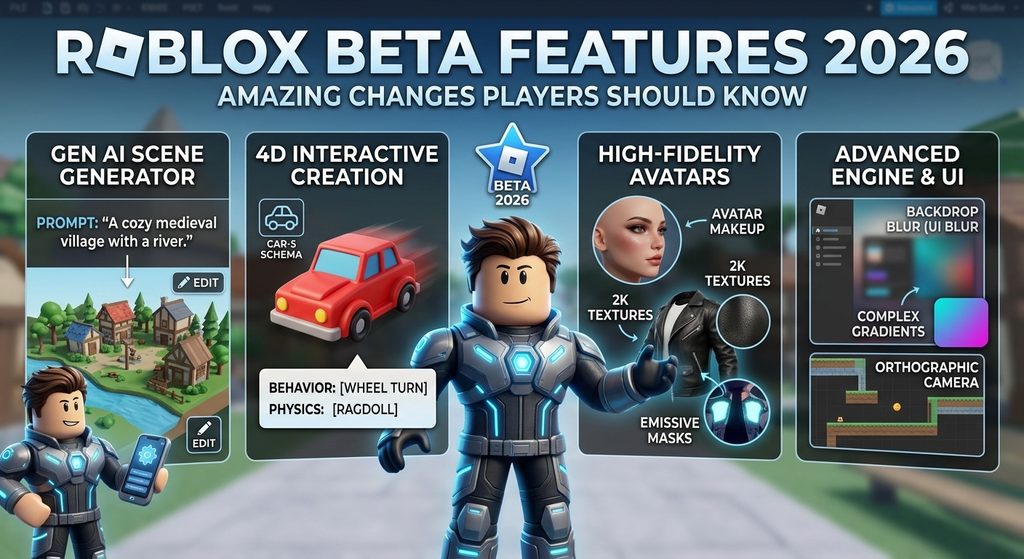
Roblox Beta Features 2026 refers to experimental tools, platform improvements, and features being tested or introduced during the year. These changes can affect how creators develop games and how players discover, communicate, and interact within Roblox experiences.
Roblox Studio includes a dedicated Beta Features menu where eligible creators can enable certain experimental tools. Other platform updates are introduced through official releases, app updates, or gradual rollouts.
It is important not to confuse Roblox Studio Beta with a separate Roblox player application. A beta tool in Studio does not automatically mean that Android or iOS players receive a new game feature.
For the latest announcements, visit the official Roblox Creator Updates page.
1. Improved Game Creation Tools
One of the most important areas of Roblox development is making game creation more accessible and efficient. Roblox continues to introduce tools that help creators build environments, design interfaces, and develop interactive gameplay.
In 2026, Roblox has announced developments involving AI-assisted creation, improved asset workflows, and additional options for building different types of games.
These tools can help developers:
- Build game environments more efficiently.
- Organize models and other assets.
- Experiment with new gameplay ideas.
- Improve the appearance of their experiences.
- Reduce repetitive development tasks.
For players, these improvements may eventually lead to more varied experiences and more polished games. However, the features available in a particular game depend on its developer.
2. AI-Assisted Game Development
AI-assisted creation is another important development in the Roblox ecosystem. Roblox has announced tools intended to help creators develop game content through prompts and other assisted workflows.
For example, Roblox discussed prompt-based scene generation and mobile-first creation initiatives at its September 2026 Developers Conference. These developments aim to help creators move from an idea to a working prototype more efficiently.
Potential benefits include:
- Faster prototyping of game ideas.
- Easier experimentation with environments.
- More opportunities for beginners to learn game development.
- Additional ways to refine and customize generated content.
Availability can vary by feature, region, and access program. AI-assisted creation should not be confused with an automatic way to unlock premium items or gain advantages in existing games.
Read the official Roblox 2026 announcements for details.
3. New Possibilities for 2D and Puzzle Games
Roblox is widely associated with 3D multiplayer experiences, but its development tools are expanding to support different styles of gameplay.
Roblox announced improvements intended to make 2D, isometric, top-down, and puzzle-style experiences easier to develop. These developments include an orthographic camera and additional visual tools.
An orthographic camera can help creators design games where objects remain visually consistent in size regardless of their distance from the camera. This can be useful for certain platformers, strategy games, and puzzle experiences.
Other improvements to interface styling and image handling can help developers create clearer, more engaging game environments.
For players, this means the Roblox ecosystem may offer more variety than traditional 3D worlds alone. The actual experience will depend on what individual developers build and publish.
4. Better Visual Effects and User Interfaces
A game’s interface affects how easily players navigate menus, understand objectives, and interact with controls. Roblox Studio continues to introduce improvements that give developers more flexibility when designing user interfaces.
Depending on the feature and its release status, creators may have access to capabilities such as:
- More flexible gradients.
- Improved text and interface shadows.
- Additional corner-rounding options.
- Better visual presentation for menus and buttons.
- Tools for building more polished interfaces.
These capabilities can help developers create interfaces that look more professional without relying on complicated workarounds.
Keep in mind that a Studio interface feature is a development tool, not necessarily a new setting that players can switch on in the Roblox mobile application.
5. More Ways to Discover Roblox Games
Finding interesting experiences is a major part of using Roblox. Platform discovery systems help players find games based on different signals and browsing activities.
In its September 2026 announcements, Roblox described changes to game discovery and improvements intended to help users find experiences that better match their interests.
The platform has also been developing additional ways to discover games through gameplay-related video content and other discovery surfaces.
For players, these changes may make it easier to explore new experiences. For creators, discovery improvements can create new opportunities to reach an audience.
However, no update guarantees that a particular game will become popular or appear at the top of recommendations. Discovery depends on multiple factors, and availability can differ by age group and region.
6. Improved Communication Between Friends
Roblox is not only a game platform; it is also a place where friends meet and play together.
Roblox announced a new Friends chat tab and voice typing in its September 2026 conference updates. These developments are intended to help users coordinate and communicate across experiences.
Depending on availability and account settings, communication-related improvements may make it easier to:
- Coordinate with friends before joining a game.
- Move between experiences together.
- Communicate using supported input methods.
- Spend less time switching between different activities.
Communication features are subject to Roblox’s safety policies, account eligibility, regional availability, and applicable age requirements. Always use the official application and review your account’s privacy and communication settings.
7. Browser-Based Roblox Gaming
Another announced development is browser-based gameplay. Roblox stated in September 2026 that it planned to let players join experiences through Chrome using an experience’s details page, without requiring a separate app installation for that particular flow.
The announcement described this capability as an upcoming rollout by the end of 2026. Availability should therefore be checked against the latest official announcements rather than assumed for every player or region.
If browser-based gameplay becomes available to your account, it could offer a convenient way to try supported experiences.
Before using this option, remember:
- Open games through official Roblox pages.
- Check whether the browser feature is available to you.
- Do not enter your password on unofficial websites.
- Never download suspicious files that claim to unlock browser gameplay.
For general account and platform information, visit the official Roblox website.
8. More Opportunities for Offline Play
Offline gaming is a common request among players who have unreliable internet access. Roblox discussed offline solo play at its September 2026 Developers Conference.
According to the announcement, creators will be able to enable offline solo play alongside live multiplayer modes, with availability planned by mid-2027 and early access expected earlier.
This means offline play should not be treated as a feature that every Roblox game already supports in 2026.
When available, the feature could allow supported experiences to continue without a constant internet connection. Multiplayer interactions and online services would still have limitations when a device is offline.
For now, keep your Roblox application updated and check official announcements for availability. Avoid third-party applications claiming to provide universal offline Roblox gameplay.
9. How to Access Roblox Beta Features Safely
If you want to try experimental Roblox features, the correct method depends on whether you are a player or a creator.
For regular Roblox players
- Open the official Roblox application or website.
- Sign in using your legitimate account.
- Check for application updates through your device’s official app store.
- Review official announcements for player-facing features.
- Open the relevant experience and check whether the feature is available.
- Follow any eligibility or account requirements shown by Roblox.
Regular players generally cannot enable every Roblox Studio Beta feature from their game settings.
For Roblox Studio creators
- Install and open Roblox Studio from an official Roblox source.
- Open a project you are authorized to edit.
- Look for File > Beta Features, where supported options may appear.
- Read the description of the feature you want to test.
- Enable the required option and save your work.
- Restart Studio if prompted.
- Test the project carefully before publishing changes.
Not every beta feature is available to every creator. Menu options and instructions can change as features move through testing and release stages.
The Roblox Studio setup documentation provides additional guidance.
10. Roblox Beta Features vs. Regular Roblox Updates
Understanding the difference between experimental tools and regular updates can prevent confusion.
| Feature type | What it means | Who it primarily affects |
|---|---|---|
| Studio Beta | Experimental development tools | Game creators |
| Official platform update | A feature released or rolled out by Roblox | Players, creators, or both |
| Experience update | A change made to an individual game | Players of that experience |
| Mobile application update | Changes to the Roblox app itself | Supported mobile users |
| Early access program | Limited access before broader availability | Eligible participants |
A feature described as beta may be changed, restricted, or discontinued before full release. A feature announced by Roblox may also take time to reach every account.
Before writing off a feature as missing, check its official release status and whether your device or account meets the requirements.
Common Roblox Beta Problems and Solutions
Some users may experience problems when trying to access a new feature. The following checks can help.
The feature is missing
The feature may be limited to Studio, available only to selected creators, or still rolling out. Review the official announcement to confirm eligibility.
Roblox Studio does not show Beta Features
Make sure you are using the desktop Roblox Studio application and that it is up to date. Some options may not be available in your version or account.
Roblox is not updating
Check your internet connection, available storage, and device compatibility. Restart the application and use the official update source for your platform.
A beta feature causes errors
Experimental features may contain bugs. Save a backup of your project before testing them. If an option causes problems, disable it when possible and report the issue through official Roblox developer support channels.
A website offers a special beta APK
Be cautious. An unofficial APK claiming to unlock hidden features may expose your account or device to security risks. Use official Roblox distribution channels and avoid sharing your login details.
For related troubleshooting guides, visit RobloxBeta.pro.
Frequently Asked Questions
What are the latest Roblox Beta Features 2026?
Roblox’s 2026 developments include experimental Studio tools, AI-assisted creation initiatives, improvements for 2D game development, interface enhancements, and new ways to discover and communicate about experiences. The availability of each feature varies.
Are Roblox Beta features available on Android?
Some player-facing updates may be available on Android, but many Roblox Studio Beta tools are intended for desktop creators. Check the requirements for each feature rather than assuming all beta tools work on mobile.
Do I need a special Roblox Beta APK?
Not necessarily. Many updates arrive through the standard Roblox application or Roblox Studio. Avoid downloading unofficial APK files that promise exclusive features.
Can beta features improve game performance?
Some development tools help creators optimize or test their games, but enabling a beta feature does not automatically make every Roblox experience run faster. Performance depends on the game, device, network, and implementation.
Are all announced Roblox features available now?
No. Some features are fully released, while others may be in beta, early access, gradual rollout, or planned for a later date. Always verify the latest official status.
How can I keep up with new Roblox updates?
Check the official Roblox Creator Updates page, the Roblox Newsroom, and relevant official help documentation. These sources are more reliable than unofficial download sites or unverified social media posts.
Conclusion
Roblox Beta Features 2026 highlight the platform’s continuing development across game creation, interface design, discovery, and communication. These improvements can give creators new ways to build experiences and may offer players more opportunities to explore different kinds of games.
The most important thing is to distinguish experimental Studio tools from updates available to regular players. Check official release information, keep your application updated, and avoid unofficial downloads promising features that Roblox has not confirmed.
By following trusted announcements and using supported tools, you can stay informed about Roblox’s evolving features while keeping your account and device safer.